Sanctions and AML Screening in the Web Portal

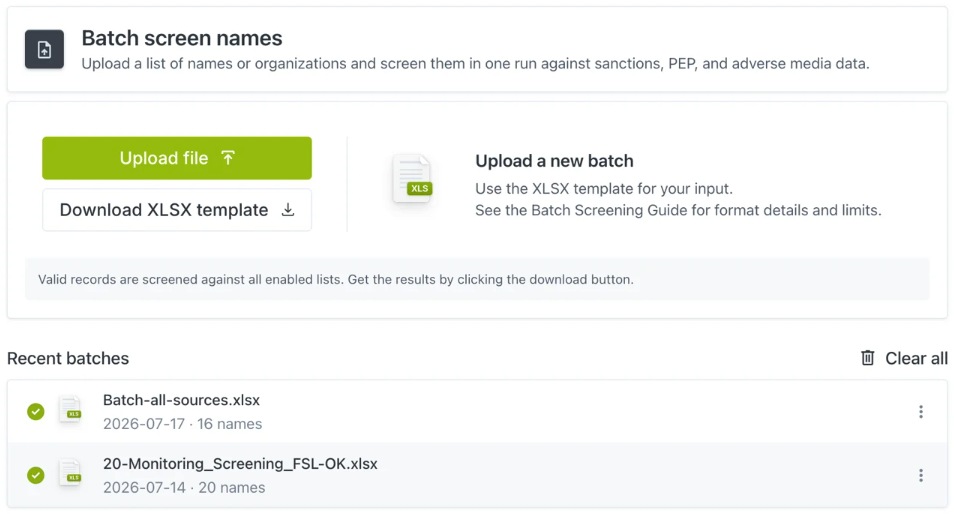
Screen a single name in seconds, or upload up to 9,999 records in one batch. Check individuals, organizations, vessels and aircraft against global sanctions, PEP, crime and high-risk jurisdiction lists, with no code and no setup.

Or compare single and batch screening
~350 ms
Avg API response
Hourly
Data updates
400+
Customers
SOC 2
Type II compliant
app.sanctions.io · Single Screening
Screen a name
Search across sanctions lists, PEP databases and criminal watchlists.
Search
Sanctions Lists Individual Confidence score 88%
Matches
Waiting
Enter a name to screen.
Recent screenings

Single Screening or Batch Screening

Two ways to screen in the same portal. Choose one to see how it works.
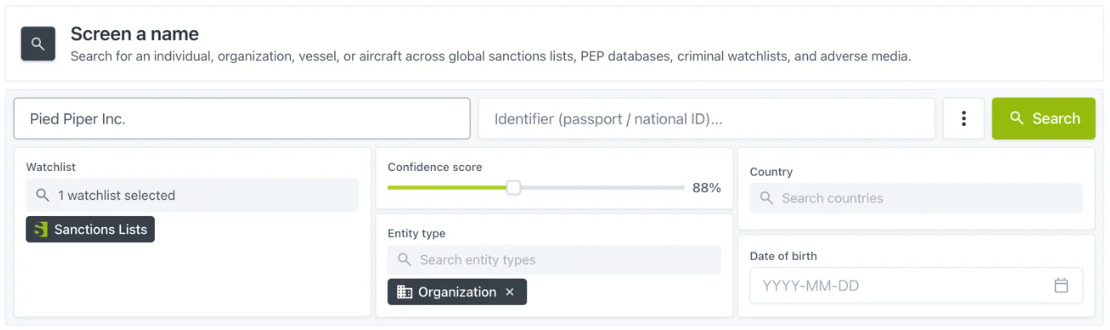
app.sanctions.io · Single Screening
Screen a name with watchlist, confidence score, entity type, country and date of birth fields

Screen an individual, organization, vessel or aircraft. If no list is chosen, the Sanctions Lists collection is used by default.

No uploads, no setup

Sign in and screen. Nothing to install and no technical integration.

Identifiers as evidence

Passport, national ID, tax ID, email, domain, SWIFT, IMO, aircraft registration or wallet address.

Saved configurations

Store your watchlists, score, entity type and country once, and restore them for the next check.

Audit-ready PDF

A branded report stating what was screened, by whom and when, ready to share as is.

API-Based Screening vs Web Platform Screening

Same data, same matching, two ways to run it. Many teams use both: the API inside the product, the web platform for reviews and one-off checks.

API-based screening
Web platform screening
Run by your engineering teamScreening sits inside your own product, onboarding flow or back office.
Run by your compliance or operations teamNo code and no integration project. Just a login.
Names screened automaticallyEvery signup, payment or record change triggers a check, in roughly 350 ms per call.
Names screened when you chooseType one in, or upload a spreadsheet of up to 9,999 records per batch.
Results in your own systemsEvery response comes back as structured JSON for your workflows and logs.
Results ready to hand overEvery search exports as a PDF stating what was screened, against which lists, by whom and when.
Best for scaleHigh volumes and teams that want screening built into the product.
Best for getting startedPeriodic reviews, one-off checks and teams without developer time.
Explore Our API

Watchlist Coverage

Four data sets, screened together in one search. Hover over a card to see what it covers.

Sanctions Lists

For example OFAC, UN, EU and UK HMT/OFSI, plus regional lists across 30+ jurisdictions, refreshed every 60 minutes.

Sanctions Lists Coverage

PEP Profiles

Politically exposed persons worldwide, including their family members and close associates.

PEP Coverage

Adverse Media

Negative news from 200,000+ sources, tagged by risk category such as financial crime and fraud.

Adverse Media Coverage

Criminal Watchlists

For example Interpol Red Notices, FBI Most Wanted and other law enforcement watchlists.

Criminal Watchlist Coverage

Custom Confidence Scores for Your Risk Appetite

Set a separate minimum confidence score for sanctions, PEP and adverse media matches. Each data set carries a different level of risk, so each one can have its own threshold.

Stricter where it matters
Keep sanctions broad so nothing slips through, and tighten PEP or adverse media to cut the noise.
Fewer false positives
A higher score returns fewer, more precise matches, so your team reviews less noise.
A threshold you can defend
Record the thresholds you chose and why, so the decision holds up in an audit or examination.
app.sanctions.io · Confidence score settings
Screening: Alexander Petrov  
Illustrative example only. Each slider shows the minimum confidence score being adjusted, and which matches it lets through.

Hear From Our Customers

"The product is amazing and the tech is tight. We integrated the sanctions.io API within a couple of days and now perform daily screenings of our entire customer base."

Dan Westgarth
COO, Deel Inc.

"Our experience with sanctions.io has been transformative for our compliance processes. Their reliable and comprehensive data feeds give us the peace of mind that comes from operating within international compliance standards."

Armand Brunelle
CTO, WeFi Technology Group

"sanctions.io combines robust, reliable and industry leading technology with hands on customer support. We implemented full passenger vetting in a matter of days and have had no issues with the API since inception."

Patrick O'Brian
Flight Operations, Innotech-Execaire Aviation Group

Trusted by 400+ Organizations Worldwide

Customer logoCustomer logoCustomer logoCustomer logoCustomer logoCustomer logoCustomer logoCustomer logoCustomer logoCustomer logoCustomer logo
400+Customers
MillionsDaily Screenings
100+Data Sources
99.995%Uptime
SOC 2Compliant
Next step

Talk Through Your Screening Process With Us

Bring the names you screen today and how often you screen them. We'll run single and batch screening on your own data and show where automation could take over. No deck.

What happens next
A short call
Your names, your lists, your volume. No discovery deck.
A sandbox key the same day
Screen real names against live lists before any contract.
Live same-day
Most teams are screening real records on the day they start.

The practical guide to sanctions screening

How screening programs are built, tuned and defended: list selection across OFAC, EU, UN and HMT/OFSI, thresholds you can defend in an examination, false-positive management, and the evidence examiners ask for.

Implementation guide

Step-by-step help implementing sanctions.io into your compliance process and systems, including field catalogs, Postman collections and code snippets in several languages.

sanctions.io product data sheet

The one-pager procurement and IT ask for: full list inventory, refresh cadence, endpoint reference, latency and uptime figures, security posture, data residency and deployment options.

Screening in the Web Portal, Answered

The questions compliance and operations teams ask before their first screening.

Resources